Why APK Instead of Google Play?
Google Play Store prohibits real-money gaming apps under its developer policies, which is why Rokda7 — like most Indian gaming platforms — distributes its app directly as an APK (Android Package Kit). This is standard practice across the industry. The APK file hosted at rokda7game.com is digitally signed, regularly updated, and scanned for malware before every release. Millions of players across India have downloaded it safely.
Downloading APKs outside the Play Store simply requires enabling one permission on your Android device — a process that takes under 30 seconds. Once done, installation is identical to any other app.
Before You Begin — Requirements
Make sure you meet the following requirements before downloading:
- Android Version: Android 5.0 (Lollipop) or higher. Most smartphones manufactured after 2015 qualify.
- Free Storage: At least 50 MB of available storage space on your device.
- Internet Connection: A stable Wi-Fi or 4G/5G connection. Avoid downloads on slow 2G connections to prevent file corruption.
- Age Requirement: You must be 18 years of age or older to register and play.
- Eligible State: Real-money gaming is restricted in Andhra Pradesh, Assam, Odisha, Telangana, Nagaland, and Sikkim. Players from these states cannot register.
Step-by-Step Download Guide
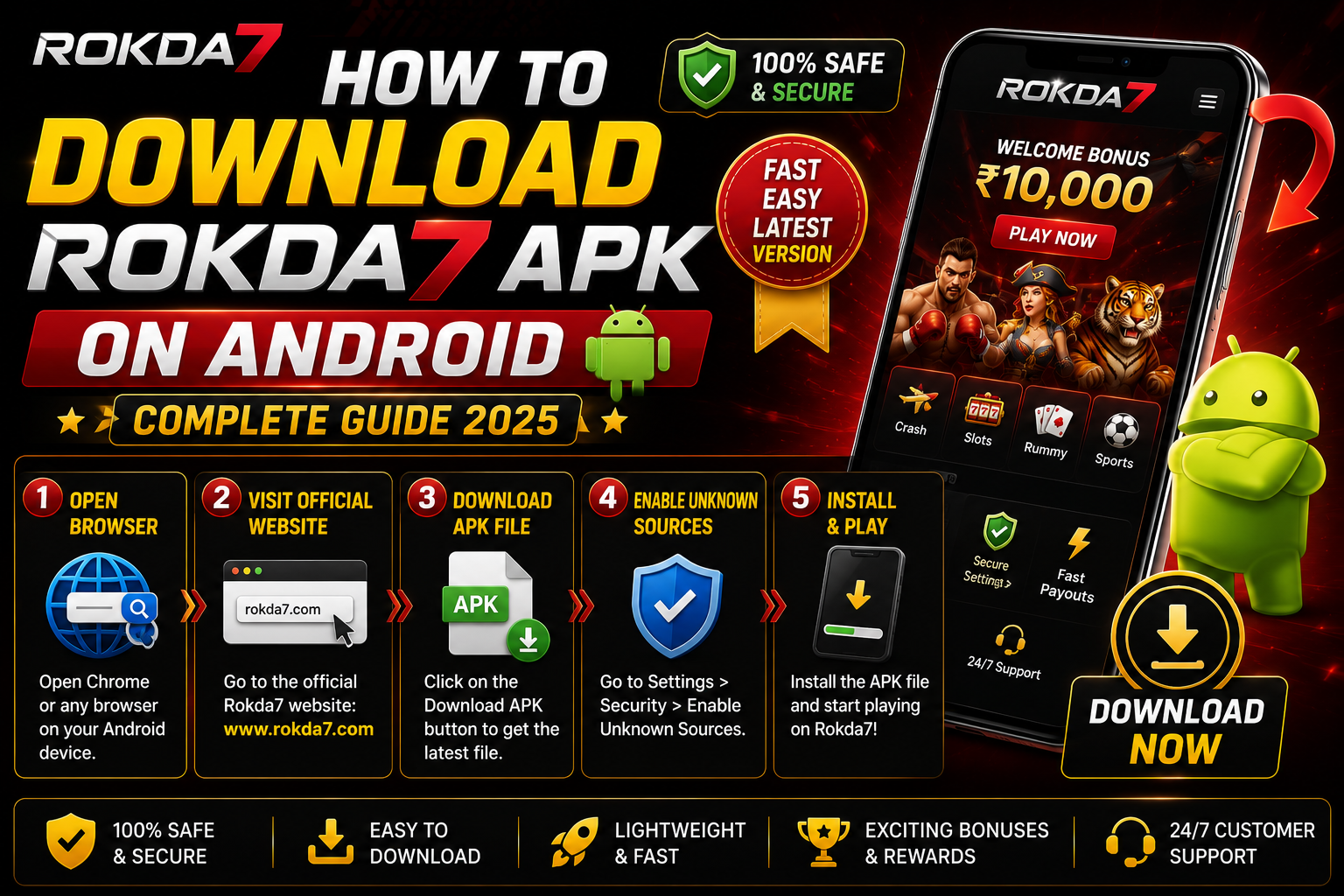
Follow these 5 steps exactly and you will be playing within minutes:
-
Enable "Install Unknown Apps" on Your Android Device
Since the APK comes from outside the Play Store, Android requires a one-time permission grant. Go to Settings → Security → Install Unknown Apps (the exact path may vary slightly by manufacturer — on Samsung devices it is under Settings → Biometrics & Security → Install Unknown Apps; on Xiaomi/Redmi it is under Settings → Privacy → Special App Access → Install Unknown Apps). Find your browser (Chrome or Firefox) in the list and toggle "Allow from this source" to ON. You only need to do this once.
-
Visit the Official Download Page
Open your Android browser and navigate to rokda7game.com. Always download from the official website to ensure you get the authentic, unmodified APK. Do not download from third-party APK mirror sites as these may contain modified files. Look for the bright red "Download APK" button prominently displayed on the homepage or visit the Download page directly.
-
Tap the Download APK Button
Tap the Download APK button. Your browser will prompt you to confirm the download — tap "Download" or "OK." The file size is approximately 45–50 MB. The download typically takes 30–60 seconds on a 4G connection. You will see the download progress in your notification bar. Once complete, your browser will show a "Download complete" notification.
-
Open the Downloaded File and Install
Tap the "Open" button in the download notification, or go to your Downloads folder and tap the Rokda7 APK file. Android will launch the installer screen showing app permissions. Review them and tap "Install." The installation takes about 10–15 seconds. Once complete, you will see an "App installed" confirmation screen. Tap "Done" or "Open" to proceed.
-
Open the App, Register, and Claim Your Bonus
Tap the Rokda7 icon on your home screen or app drawer to launch the app. On the welcome screen, tap "Register" and fill in your mobile number, create a secure password, and enter the referral code if you have one. Verify your mobile number via OTP. Once registered, navigate to the Bonuses section and activate your ₹10,000 welcome bonus before making your first deposit.
Troubleshooting Common Issues
If you encounter any problems during installation, here are the most common issues and their solutions:
- Install Blocked / "Blocked by Play Protect": This is Android's security warning for apps from outside the Play Store. Tap "Install Anyway" — Rokda7's APK is digitally signed and safe. Alternatively, you can temporarily disable Play Protect via Play Store → Menu → Play Protect → Settings → toggle off "Scan apps with Play Protect."
- App Crashes on Launch: This usually means the APK file was corrupted during download. Delete the APK file, clear your browser cache, and re-download from rokda7game.com. Also ensure your Android version is 5.0 or higher by checking Settings → About Phone → Android Version.
- Download Too Slow or Failing: Switch from mobile data to Wi-Fi, or vice versa. If using mobile data, ensure you have at least 4G signal strength. You can also try a different browser — if Chrome is failing, try Firefox or the stock browser. Avoid downloading in low-signal areas or during peak network hours (8–11 PM).
- Account Registration Error: Double-check that your mobile number is entered correctly with no extra spaces. If you receive an "OTP not received" error, wait 60 seconds and tap "Resend OTP." If the issue persists, contact support at affiliate@ix7gameapk.net with your device model and Android version.
Claiming Your ₹10,000 Welcome Bonus
Once the app is installed and you are registered, follow these steps to activate your welcome bonus:
- Log in to your Rokda7 account.
- Tap the "Wallet" or "Deposit" icon in the bottom navigation.
- Make your first deposit using UPI, PhonePe, Google Pay, or Paytm (minimum deposit applies).
- Go to the "Bonuses" section and find the Welcome Bonus offer.
- Tap "Activate" — the bonus amount will be credited to your bonus wallet instantly.
- Start playing eligible games to convert bonus funds to real withdrawable cash (wagering requirements apply — see our Bonus Guide for full T&C).
The ₹10,000 welcome bonus is one of the most generous offers in Indian gaming. Do not forget to claim it before you start playing — once you have wagered without activating the bonus, you cannot retroactively apply it.
Keeping the App Updated
Since Rokda7 is not on the Play Store, automatic updates will not happen. When a new version is available, you will receive an in-app notification or can check rokda7game.com for the latest APK. Updating is as simple as downloading the new APK and installing it over the existing app — your account data and balance are stored on the server, not your device, so nothing is lost during updates.
How the Rokda7 Mobile App Compares to the Browser Version
Many players wonder whether it is worth going through the APK installation process when the site already works in a mobile browser. The short answer: the native app experience is meaningfully better in several ways that matter during live gameplay.
The rokda7 mobile app is optimised at the rendering level — animations in Aviator and Colour Prediction load faster, touch inputs register with less latency, and the lobby layout adapts to your screen size without the overhead of a browser chrome. Push notifications are another exclusive advantage. The app can alert you to a flash deposit bonus, a Colour Prediction round about to start, or a withdrawal confirmation the moment it processes — none of which is possible through a browser tab.
Battery and data consumption are also friendlier on the native app. The APK pre-caches assets locally, so repeated visits to the lobby do not re-download the same graphics over mobile data. For players in areas where 4G coverage fluctuates, this translates to smoother sessions even when signal dips briefly.
| Feature | Rokda7 App (APK) | Mobile Browser |
|---|---|---|
| Load Speed | Faster (cached assets) | Slower on repeat visits |
| Push Notifications | Yes — bonus & game alerts | No |
| Biometric Login | Fingerprint / Face ID | Password only |
| Data Usage | Lower (local cache) | Higher per session |
| Version Control | Manual update via new APK | Always latest (no install) |
What to Expect After the Rokda7 App Install
First-time players sometimes feel uncertain about what happens after the rokda7 app install completes. Here is a realistic walkthrough of the first session so there are no surprises.
When you open the app for the first time, you land on the registration screen. The sign-up form asks for your mobile number, a password, and an optional referral code — the whole process takes under two minutes. After OTP verification, you are dropped straight into the game lobby. You will notice categories for Rokda7 Slots, Aviator, Teen Patti, Live Casino, and Colour Prediction arranged across a tabbed menu at the bottom.
Before playing for real money, head to the Wallet section and complete KYC (Know Your Customer) verification. Rokda7 requires a valid government ID — Aadhaar or PAN card — to process withdrawals. Submitting documents early avoids delays when you are ready to cash out. KYC approval typically takes 15–30 minutes during business hours.
For your first deposit, UPI is the fastest method — funds appear in your Rokda7 wallet within seconds. Once credited, activate the welcome bonus from the Promotions tab before placing any bets, because the bonus cannot be claimed retroactively. With that done, you are fully set up and ready to explore everything from the high-volatility Aviator crash game to the relaxed pace of Teen Patti tables.
Key Takeaways
- The rokda7 apk download is safe and official — only download from rokda7game.com, never from third-party mirror sites.
- Enabling "Install Unknown Apps" in Android settings is a one-time step that takes under 30 seconds and does not reduce your device security when sourcing from a trusted site.
- The rokda7 latest version brings performance improvements and new game additions — check for updates inside the app or on the official site whenever you notice a prompt.
- Always activate your welcome bonus before placing your first real-money bet; the offer cannot be applied after you have already wagered.
- Complete KYC (Aadhaar or PAN) immediately after registration to ensure smooth rokda7 withdrawal processing without delays when you decide to cash out your winnings.